The Business video verification is the most crucial method of verification which Google uses The simple & easy way to get your Google Business Profile verified is by using the “Phone Code Verification” method. But sometimes Google needs more information on your business authenticity & it only gives you an option to verify using video verification method.
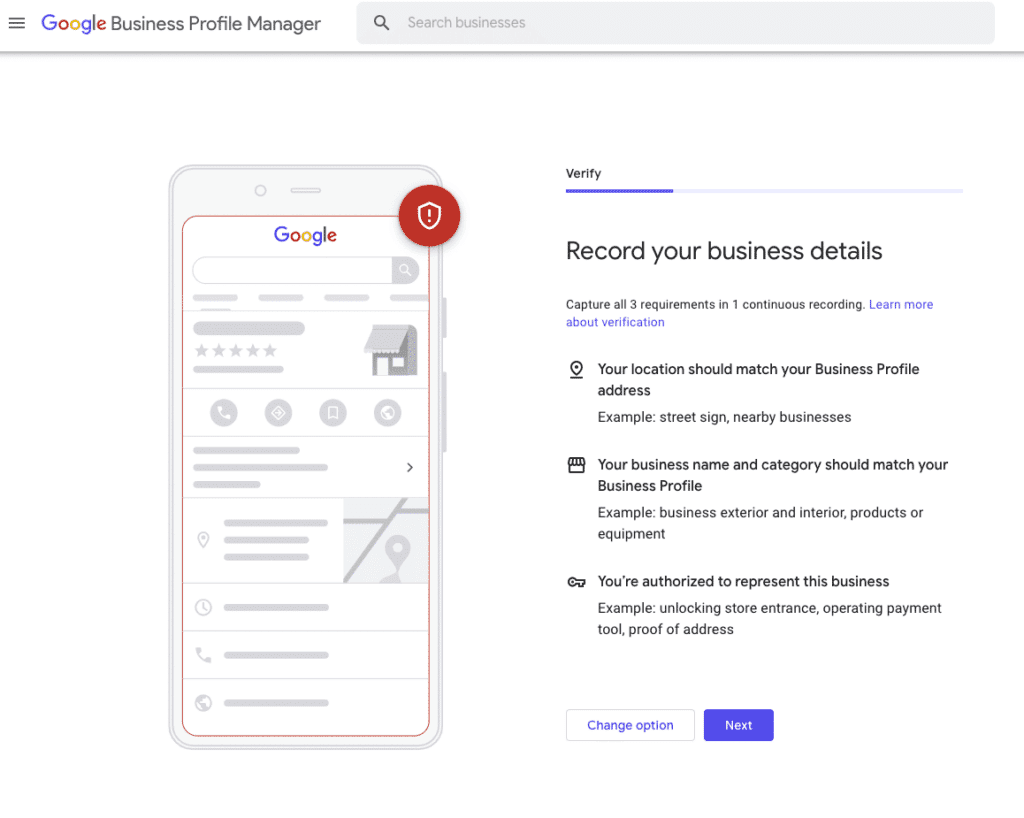
The Business video verification is the most crucial method of verification which Google uses to confirm that your business is legitimate & you are authorised personnel to handle it. For successful verification ensure that you record a single continuous video without using pause or stop button. The video should be at least 30 seconds long & should cover all 3 parameters in a single video as described below.
A Simple 3 Steps Process for Business Video Verification
If you have all things in place its simple 3 step process to verify Location, Business existence & Proof of management.
Proof of Location: Start Recording by showing the nearby streets, any signages, surrounding businesses or prominent landmarks, if available. This ensures the exact location of your business on Google maps.
Proof of Existence: Now move inside your business space and show the Nameplate or Signage where the name of your business is written, followed by your workspace, products on shelves or related equipment.
Proof of Management: To capture this part you should have ownership rights, as you will have to show the business records which contain licence, bills or accounting statements. The relevant businesses will have to show the access to Staff only areas such as Server room, Kitchen or restricted areas for the public.
Once the video is recorded you need to upload the video & wait for the verification to be completed by google. It may take up to 5 days for successful verification.
Key points to remember
The first important thing is that the video should be clear with good visibility.
Things such as name, texts written on documents or other signages should be readable, it should not be blurry.
Avoid recording sensitive information or capturing the faces of the people in the verification video.
Do not pause or stop the video it should be a single uninterrupted & continuous video.
FAQs
Can I choose different verification method?
In most of the cases, Google itself will give you an option for verifying the profile, If you have been given the option of Video verification. Then you will have to complete verification by this method only.
Is it necessary to talk during video?
No, its not necessary to give voiceover during the video, as google will review only the visuals for evidence.
My video upload is failing repeatedly.
First check your internet connection, then have a look at file size. Try recording it in 720p & keep the file size small. Also check for the cache files, clear cache & try again.
My video is rejected by Google.
Google provides the reason for rejection. Re-read that again & try to address the issues. Some of the common errors are
The Business name & address recorded in the video should be exactly same as that of Google Business Profile.
Avoid recording sensitive content like faces, Personal Identification or finance documents.
Video should be one shot & continuous, do not edit the video in any way.