7
n8n workflows in the content system
From importing the coach's Vimeo videos to drafting posts in her voice
Videos become memory
Each coaching video is summarised and stored in Supabase, where the AI can search it.
Ideas from recent sessions
Gemini reads the latest video summaries and suggests 3 to 5 post ideas.
Four formats
Each idea becomes a carousel, a reel script, a newsletter or a community post.
Her voice, every time
The writing agent must load the coach's voice profile before it writes anything.
Grounded in her teaching
Every draft searches her own videos first, so posts use what she actually teaches.
Drafts, not autopilot
It writes drafts for the coach to refine. It was never meant to post on its own.
Built with
n8nVimeo APISupabase (pgvector)Google GeminiOpenAI embeddingsAirtableOur client is a consultant who sells AI systems to coaches. Her first customer was a German-speaking Pilates coach.
The coach runs long live sessions for her students, and records them on Vimeo. Those recordings are full of what she knows: how she explains a movement, the stories she tells, the phrases she always uses. But turning them into posts and newsletters took time and effort.
The consultant wanted a system that does that work for her: one that learns the coach's voice from her own videos, and drafts content that sounds like her. We wrote the proposal and built it in n8n.
What the coach needed
The brief came out of the proposal we wrote with the consultant. The system had to:
- Learn from her recordings. Read the coach's coaching videos and keep what she says in a database the AI can search.
- Sound like her. If she always uses a certain phrase, the posts should use it too.
- Suggest posts after each session. Recommend what to post once a new recording is in.
- Start with text. Social posts and newsletters.
- Leave her in charge. It writes drafts. The best results still come from her refining them.
We agreed to start with a proof of concept, planned to take 15 days: first build the memory, then show it can write one post in her voice.
How the system works
The system has two halves.
The first half fills the memory. It pulls the coach's videos from Vimeo, reads the transcript of each one, and stores it in Supabase as searchable memory. A short summary and tags for each video go to Airtable.
The second half writes. It reads the latest summaries, suggests post ideas, and drafts each one. Before writing, the AI loads a profile of the coach's voice and searches her videos for what she has said on the topic.
How the content system fits together
Where the knowledge starts
Vimeo
The coach’s recorded coaching sessions and their transcripts.
- Three ways in
How videos come in
Run-once import
Every past video in the Vimeo folder, one at a time.
Daily check
New videos with “coaching” in the title.
Single video
One video ID from a form or a link.
- Cleaned, summarised, embedded
Where memory lives
Supabase (pgvector)
Transcript chunks with OpenAI embeddings, searchable by meaning.
Airtable
A summary per video, plus the blueprints and writing rules.
- Gemini reads and writes
What writes
Idea Generator
Suggests 3 to 5 post ideas from the top 5 summaries.
Writing agent
Loads her voice profile, searches her videos, drafts the post.
- Shaped for the app
What comes out
Drafts in four formats
Carousel, reel script, newsletter or community post, in German.
Seven n8n workflows do the work. Three bring videos in, one turns a video into memory, and three turn that memory into posts.
Getting the videos in
Importing every past video at once
To fill the memory on day one, a run-once workflow reads every video in the coach's Vimeo folder. It sends them one at a time to the workflow that processes a video, with a short wait between each one. If a video fails, the error is logged in Airtable, and the loop moves on to the next.

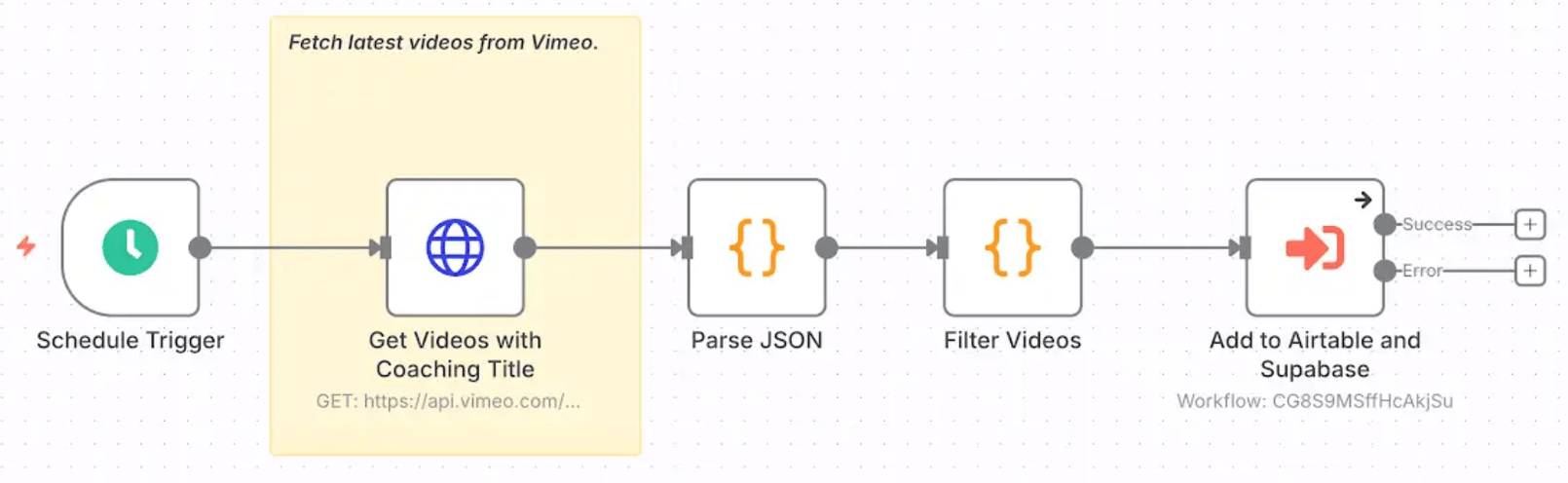
Checking Vimeo for new sessions every day
A second workflow runs on a schedule. It asks Vimeo for the latest videos with "coaching" in the title, filters out the rest, and sends each new one to be processed.
Adding one video by hand
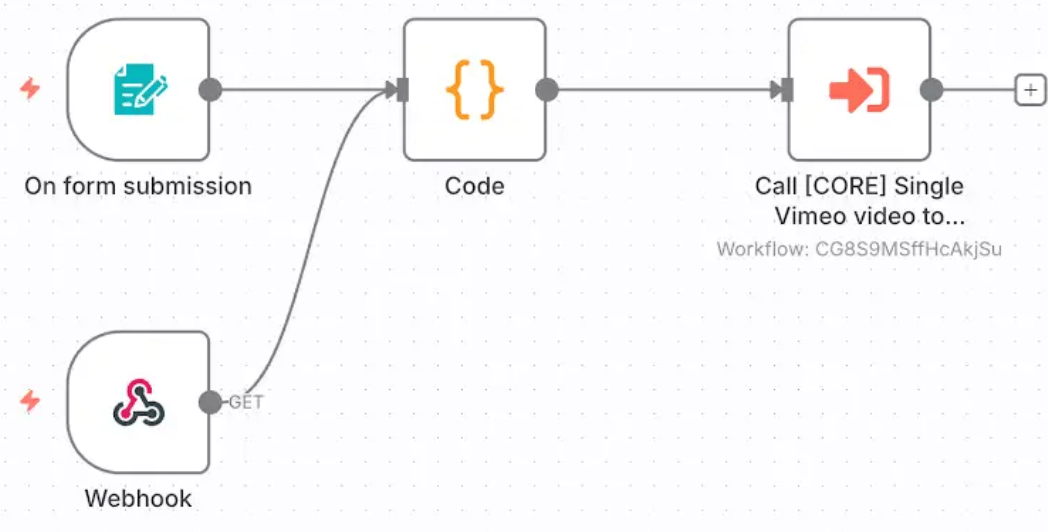
Sometimes one video needs to go in straight away. A third workflow takes a single Vimeo video ID, from a simple form or a link, and runs it through the same steps.
Turning a video into memory
This is the core of the first half. All three import workflows call it.
For each video, it:
- Gets the transcript. The proposal planned a separate transcription service. In the build, we read the transcript Vimeo already holds for the video, along with its name and details.
- Cleans it up. Code steps tidy the transcript text.
- Summarises it. Google Gemini writes a summary of the session.
- Stores it in Supabase. The transcript is split into small chunks. OpenAI embeddings turn each chunk into numbers that capture its meaning, and the chunks go into a Supabase vector store. This is what lets the AI find what the coach said about a topic later, even if she used different words.
- Logs it in Airtable. The summary is saved as a row in Airtable, where the idea step reads it.
A separate branch, set up to create tags for each video, uses Gemini too.
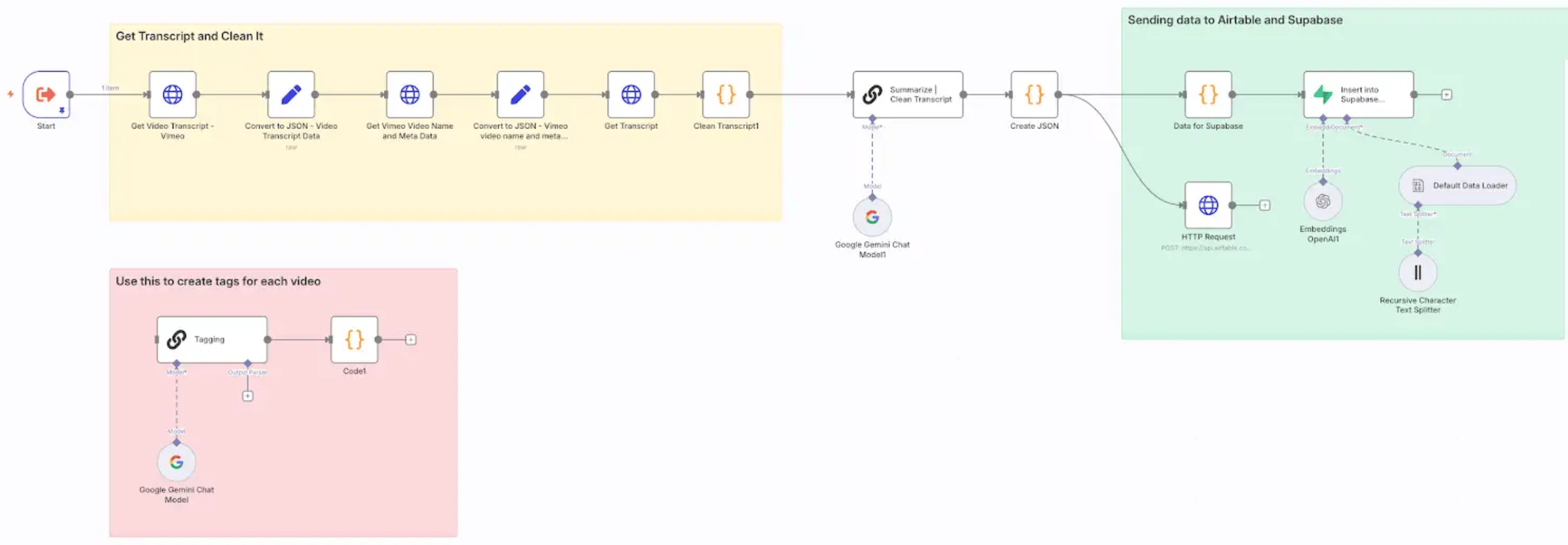
The coaching sessions are private. They stay in the system's Supabase and Airtable, and this page shows none of them.
Turning memory into posts
Suggesting post ideas
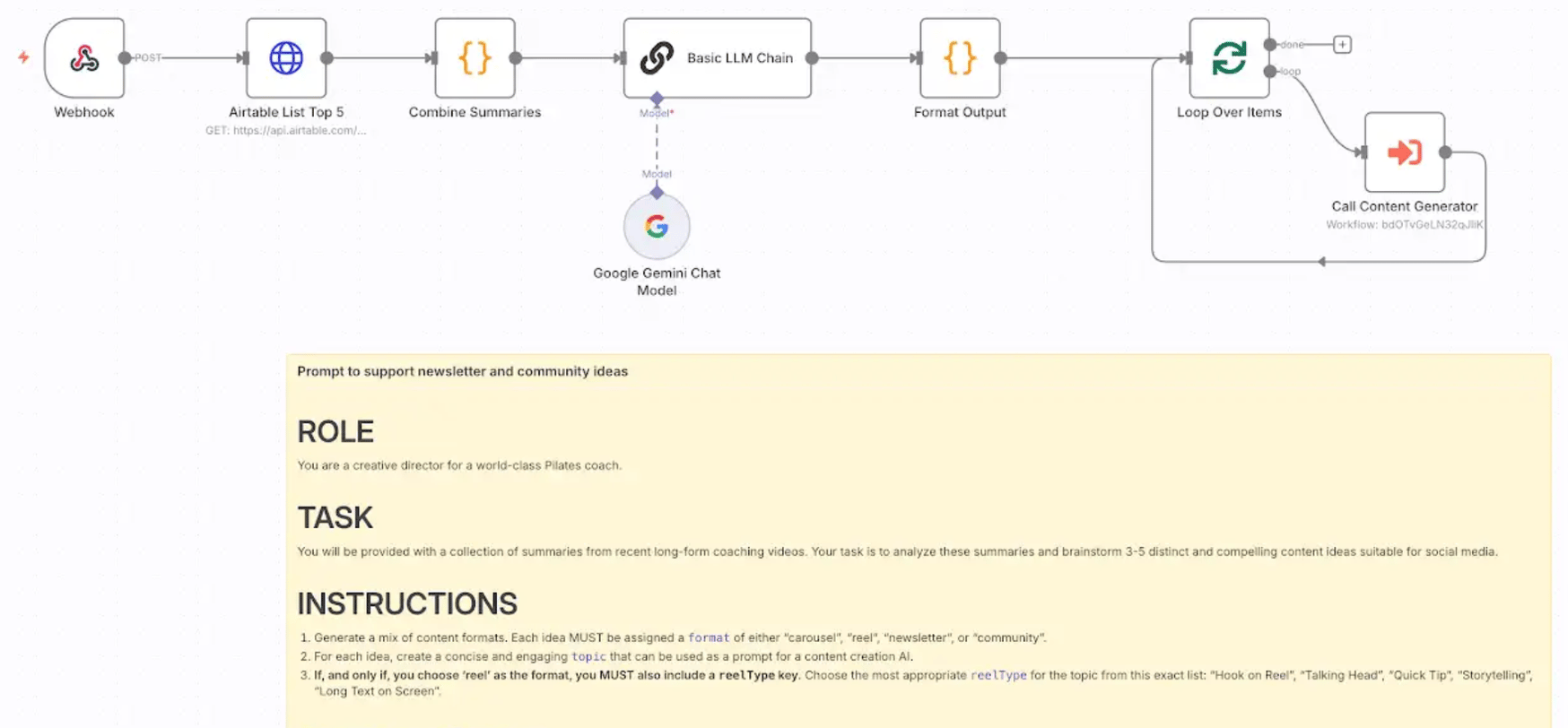
The idea workflow reads the top 5 video summaries from Airtable and hands them to Gemini. Its prompt casts it as the creative director for a Pilates coach, and asks for 3 to 5 post ideas.
Each idea comes with:
- A format: a carousel, a reel, a newsletter or a community post
- A topic the writing step can work from
- A reel type, for reels only: hook on reel, talking head, quick tip, storytelling or long text on screen
The workflow then loops over the ideas and sends each one to be written.
Writing each post in her voice
The writing workflow is where the memory and the voice come together. It works through each request in four steps.
- Pick the blueprint. The rules for each platform live in Airtable. For Instagram, there is a blueprint for each kind of post: a carousel, and each type of reel. A code step picks the one that fits, with the global writing rules and, for reels, rules for spoken language.
- Pick the shape of the answer. A second step sets what the draft must contain. A carousel gets slides and a caption with a hook, body and call to action. A reel gets a script and a caption. A newsletter gets a subject line and sections. A community post gets a message and a question to start a conversation.
- Write the draft. An AI agent on Gemini writes the post in German. Its instructions make two steps mandatory. First, it must load the coach's voice profile. Second, it must search her videos in Supabase, using the post's core idea, before it writes.
- Check the result. If the agent returns a draft, it is shaped into the format the app expects, with SEO keywords for carousels and reels. If not, the workflow returns a clear error instead.
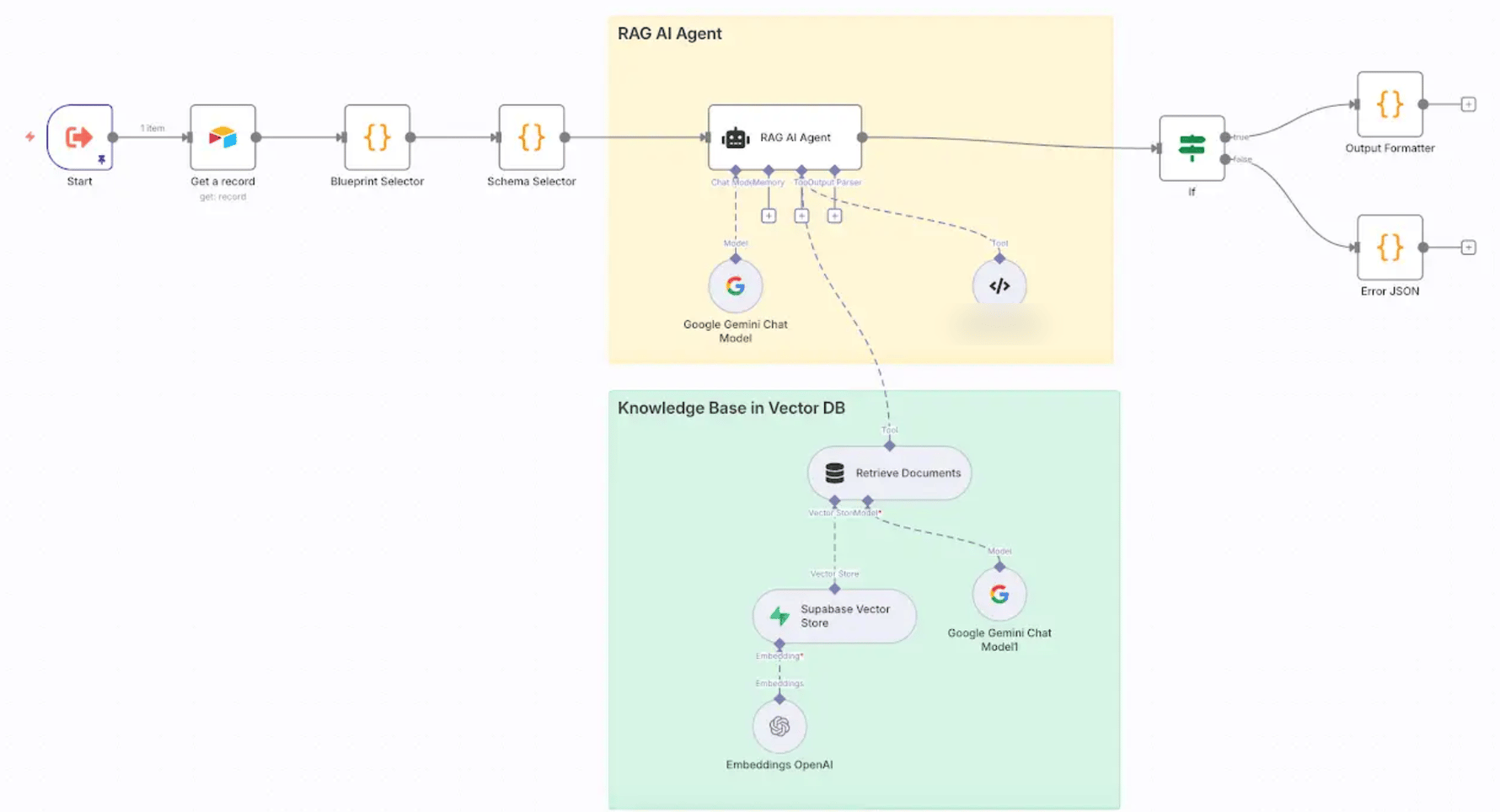
A small last workflow puts this behind a webhook, so an app can ask for a draft and get it back in the same call.
What the voice profile holds
The voice profile is a detailed description of how the coach speaks, written for the AI. It covers:
- Her tone, and how it shifts when she explains technique, comforts a student or corrects a myth
- Her signature phrases, the German expressions she uses again and again
- Her rhythm, such as short statements followed by an explanation, then a short return to the point
- Her teaching principles, so the AI explains the why behind an instruction, as she does
- A checklist the draft is held to: would she actually say this?
This is what makes a draft sound like the coach rather than like a generic AI post.
What it changed
This was a proof of concept, built for the consultant to offer to more coaches. So the changes are in what is now possible, not in numbers. We don't have figures on posts published or time saved, so we don't quote any.
- Her videos are searchable. What the coach teaches in her sessions sits in a database the AI can search by meaning.
- New sessions feed the system. Each new coaching video can be picked up, summarised and stored without anyone retyping it.
- Ideas come from her own material. Post ideas start from what she taught recently, not from a blank page.
- Drafts start from her voice. Every draft loads her voice profile and draws on her own words.
- Built to be set up again. The blueprints and writing rules sit in Airtable, outside the workflows. For another coach, the same workflows can run with her videos, her rules and her voice profile.